

Direct Booking Widgetby RentalBeam

Direct Booking Widget for Your Vacation Rental Website

Accept direct booking requests on your own website with synced availability, optional pricing, seasonal rules, fees, discounts, and guest intake controls on RentalBeam Pro. Start with a free calendar, then upgrade when you are ready to add the booking widget.

Read the direct-booking setup guide

Accept Direct Requests in 3 Steps

Booking form widget is available on Pro. It uses the same synced availability as the calendar widget and adds optional pricing, rules, and request collection.

1

Sync Availability First

Add your Airbnb, VRBO, Booking.com, or other iCal sources so guests only request genuinely open dates.

2

Configure Pro Settings

Enable the booking form and set pricing, seasonal overrides, fees, discounts, coupon codes, custom fields, and booking rules.

3

Embed and Accept Requests

Paste the booking form on your website and receive reservation requests by email with no commission on direct bookings.

Live Booking Widget Preview

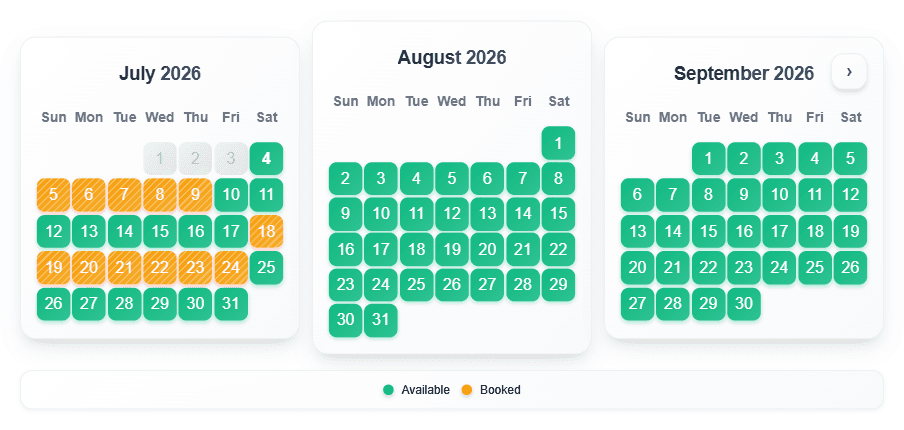
Open the real booking form in a modal preview. This booking widget is available on Pro.

Booking Widget Features

RentalBeam Pro adds the booking form on top of your synced calendar so guests can request open dates directly from your website.

Live Availability

Uses the same synced iCal availability and manual blocks as your calendar widget

Optional Pricing Display

Show nightly pricing or disable pricing entirely - requests still work either way

Seasonal Pricing

Override nightly rates, minimum stay, and discounts for specific date ranges

Configurable Fees

Cleaning, pet, service charges - flat or per-night/guest

Discount Rules

Weekly/monthly, early-bird, and last-minute discounts with stacking controls

Coupon Codes

Percent or flat discounts with usage limits, minimum nights, and expiration dates

Custom Fields

Collect guest details with text, email, phone, select, checkbox, date, and more

Guest Counts

Adults, children, and pets with per-category limits

Booking Rules

Advance notice, prep time, allowed check-in/out days, and same-day cutoff

Widget Appearance

Titles, subtitle, accent color, progress steps, success message, and savings badge

Host Notifications

Up to 3 notification email addresses plus dashboard booking inbox

Multi-Currency

USD, EUR, GBP, CAD, AUD, NZD

Responsive

Optimized for desktop and mobile booking flows

Why Hosts Add Direct Booking Widgets

Let guests request a stay on your own site while keeping Airbnb and VRBO in the mix.

Avoid OTA Commissions

Direct requests from your website help you keep more revenue instead of paying 15-20% per booking to a platform.

Prevent Double Bookings

The widget uses the same synced availability as your calendar, so guests only request genuinely open dates.

Collect Better Guest Details

Receive emails with dates, contact information, custom field answers, and the guest message so you can respond quickly.

Start with the Synced Calendar

Direct booking works best after your availability sync is live. Create that calendar first, then claim it on RentalBeam and upgrade to Pro.

Show booked dates as:

Start with synced availability first:

The booking widget becomes available on RentalBeam Pro, but it runs on the same calendar sync you set up here. Add your iCal feed now, preview the calendar, then claim it on RentalBeam and upgrade when you want the booking form.

Read the direct-booking setup guide

Widget Appearance

Custom
Upgrade to Plus
Display Language

Auto: visitors see the widget in their own browser language.

Day names and status labels (Available, Booked, Closed) are automatically translated into the selected language.

Booking Window

Control how far ahead guests can see bookable dates. Leave this on Unlimited to show all future availability, choose Days from today for a rolling window, or choose Until a specific date for a fixed cutoff.

Guests can browse all future dates that your synced sources and manual blocks allow.

Loading preview...

Create a Free Account

Unlock custom date blocking, full color customization, iCal export, and your own dashboard to manage everything.

Related Guides

Learn how synced availability and direct booking requests work together in RentalBeam.

Frequently Asked Questions

Common questions about direct booking widgets and the RentalBeam workflow

It is an embeddable booking request form that sits on your own website and lets guests contact you directly about available dates. RentalBeam keeps the widget synced with your availability calendar so guests only request genuinely open stays.

No. RentalBeam works alongside Airbnb, VRBO, Booking.com, and other iCal-connected channels. You keep your OTA listings and add a commission-free direct-booking option on your own site.

No. Guests submit a booking request and you confirm the reservation outside the platform. Optional pricing display is informational only.

RentalBeam Pro includes the booking form widget, optional pricing display, seasonal pricing, configurable fees, discounts, coupon codes, custom fields, guest-count settings, booking rules, and up to 3 notification emails per calendar.

The booking widget uses the same synchronized availability state as your calendar widget. Airbnb, VRBO, Booking.com, and manual blocked dates all feed into the same availability logic.

Yes. You can start by creating your synced availability calendar on RentalBeam Free, then upgrade to Pro when you want to add the direct booking widget to that calendar.

Direct Booking Widget for Vacation Rental Websites

A direct booking widget helps guests send reservation requests from your own website instead of bouncing back to an OTA. It works best when it sits on top of synced availability, so the guest can only request dates that are actually open across Airbnb, VRBO, Booking.com, and your manual blocks.

RentalBeam Pro adds the booking form widget after your calendar is set up. You can keep pricing hidden and use the form as a pure request workflow, or show optional pricing, seasonal overrides, fees, discounts, coupon codes, and booking rules. RentalBeam does not process guest payments - you receive the request and confirm outside the platform.

  • No commissions: direct booking requests from your own website do not trigger OTA commission fees through RentalBeam.
  • Synced availability first: the booking widget uses the same iCal-based availability as your calendar widget.
  • Optional pricing: show nightly pricing, seasonal overrides, fees, and discounts only if you want to.
  • Discounts and coupons: support early-bird, last-minute, weekly/monthly discounts, and promo codes.
  • Guest intake controls: collect custom fields, guest counts, and extra stay details before you reply.
  • Booking rules: set advance notice, prep time, same-day cutoff, and allowed check-in/out days.
  • Host notifications: receive direct booking requests by email and review them in the RentalBeam dashboard.
  • Works alongside OTAs: keep Airbnb and VRBO while giving direct guests a commission-free request option.
  • Multi-currency display: show amounts in USD, EUR, GBP, CAD, AUD, or NZD.

For implementation details, read how to accept direct bookings from your vacation rental website and start with the synced availability calendar.

Start Free, Add Direct Booking on RentalBeam Pro

Create your synced calendar now, then upgrade on RentalBeam when you want the booking form, optional pricing, guest intake controls, and commission-free direct requests.